Use with Faded Black n White Circles Background.

http://headers.blogdesignsbydani.com/Dani/Black n White Circles Header1_pic.jpg

http://headers.blogdesignsbydani.com/Dani/Black n White Circles Header1_pic.png


 If you would like this header customized with a picture of your family and names of your family, as shown, please email me at:
 3. Click and Drag on your header to create a text box.
 Or
Or 9. Choose the Settings as shown. (Picture Pile, Solid Color, Choose Any Size)
 10. Click on the picture of the Header. Move your mouse over the picture until you see the glove. Then, Click the white dot and Drag out until the header mostly fills the page. (Keep the angle at 0.) You may need to let go and slide the picture over.
 11. Now Adjust the size of your photo the same way, except rotate it at any angle you choose.
 18. Choose any folder to save it to, but click Use Original Size. (Make a note of the location that you saved it to so that you can find it later.) Click OK.
 Putting the header on your blog:
 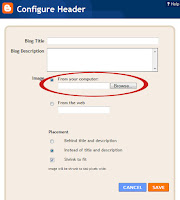 22. Click Browse and find the file where your header was saved.




To add my button to your blog:
1. Copy the html in the box above.
2. Go to your Layout page under Page Elements and click on Add a Gadget in your sidebar.
3. Choose HTML/ JavaScript .
4. Paste the html into the pop-up window.
5. Click Save!

This site is copyright protected. Do not copy any designs or tutorials and claim them as your own. You may not post my designs, tutorials and/or the given code on your blog or website, even if you give me credit. For my complete terms of use, please read my terms of use.